


MyHyundai with Bluelink
4.619.04K Reviews
App Specs
- Version
- 5.4.4
- Updated On
- License
- Free
- Downloads
- 1,000,000+
- Developer
- Hyundai Motor America
- Categories
- Productivity
- Platform
- Android, iOS
Screenshots
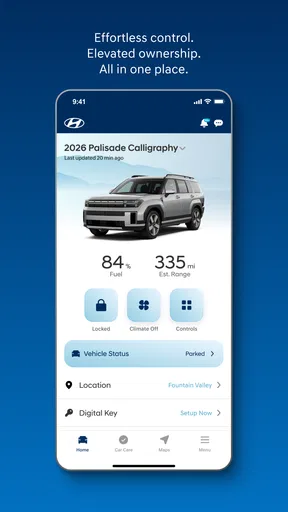
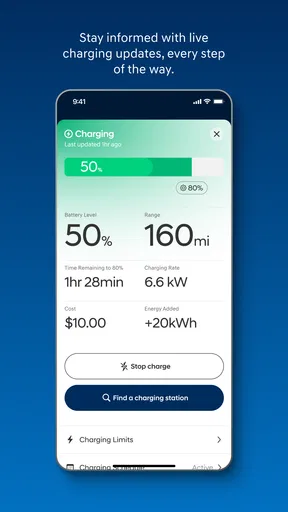
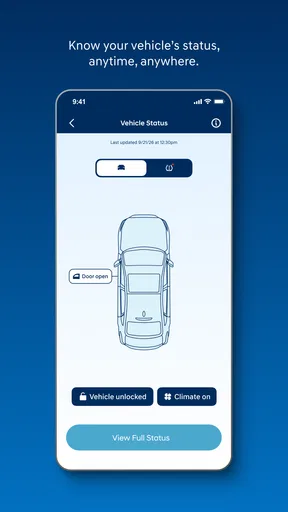
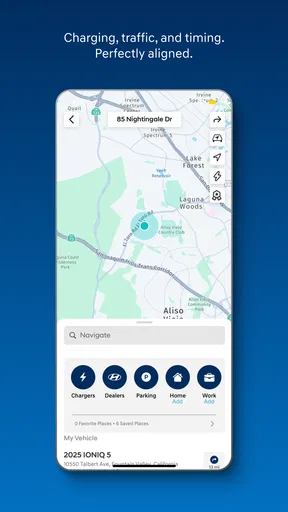
 Analysis by AppCompare
I approached MyHyundai with Bluelink as a companion for Hyundai owners who want their phone to remain useful after leaving the driver’s seat. Its purpose is straightforward: it connects a compatible Bluelink-equipped Hyundai vehicle with a smartphone, turning certain ownership tasks into mobile actions rather than things that always require a return trip to the car. That sounds simple, but the quality of the experience depends heavily on connectivity, the vehicle itself, and how quickly the app and car exchange information.
In my experience, the app makes the most sense when I treat it as a remote access tool rather than a replacement for the car’s controls. It can be handy before a journey, during a busy day away from the vehicle, or when I need to check whether a remote request has actually gone through. It is a free productivity app from Hyundai Motor America, rated for Everyone, and its broad adoption is reflected in an average score of 4.6 from around 116 thousand ratings. That gives it a reassuring starting point, although a strong store score does not remove the practical limits of connected-car software.
Where the network changes the experience
The first thing I noticed is that every remote interaction carries a small expectation: my phone sends a request, the service passes it along, and the vehicle has to respond. That is different from tapping a physical button inside the cabin. A momentary delay is therefore not automatically a fault. The app may need time to communicate with the car, and the result can depend on mobile coverage, the vehicle’s own connection, and the condition of the service at that moment.
This matters most when I am standing outside the car and expecting an immediate result. If I send a command and walk away before checking its status, I can easily be left wondering whether the request worked. My practical advice is to pause long enough to look for the app’s confirmation before assuming anything. For security-related actions, that extra moment is worthwhile. I would not use a remote request as a substitute for physically checking the vehicle when certainty is important.
A realistic everyday example is a cold or rainy morning when I have already left home and realize the car needs attention before I leave. Instead of going back outside immediately, I can open the app and try to handle the task from my phone. The convenience is obvious, but it is not magic: if the phone has weak reception, the vehicle cannot communicate properly, or the request takes longer than expected, the benefit becomes less immediate. Connectivity is part of the feature, not merely background infrastructure.
I also found that the app is easier to appreciate when I use it for preparation rather than last-second rescue. Checking the vehicle’s available information before heading out gives the system time to respond and gives me a chance to try again if something appears incomplete. Relying on a single tap seconds before an appointment is a poor workflow for any connected-car application, and this one is no exception.
The network-dependent nature of the service also affects expectations around notifications and status information. A phone screen can suggest that a request was sent, but what I really care about is whether the vehicle completed it. I therefore read the result carefully instead of treating every tap as proof of success. That habit prevents a common mistake: confusing an action being submitted with an action being confirmed.
Worth Reading Before You Choose

EA SPORTS FC Mobile 26 Is a Bigger Football Game, but It Takes Time

Flipboard Shows What News Apps Must Do Beyond the Feed

Switching to Android Auto Means Rethinking Your Driving Routine

Google Calendar Makes a Crowded Week Easier to Manage

Ludo King Makes the Most of the Minutes Between Plans

Baby Panda World Brings Quick Play to Modern Phones, but Its Game Library Feels Busy
Useful before the trip, less useful as a substitute for presence
MyHyundai is most convincing when it reduces small trips to the parking space. It can help me organize the start of a journey, check the vehicle from a distance, and deal with simple ownership moments while I am indoors or away from home. Those advantages add up for people who regularly move between work, errands, and home and do not want to return to the car for every small check.
It is less convincing if I expect an instant, perfectly synchronized control panel. Connected services are inherently less direct than a physical key or an in-car control. The app’s value comes from convenience and access, not from eliminating every delay. If I need guaranteed immediate action, I keep a physical solution or inspect the vehicle directly rather than depending entirely on my phone.
Using it in real mobile situations
The mobile design matters because I am rarely using a vehicle companion app while comfortably seated at a desk. I may be carrying groceries, walking through a parking area, or checking something quickly between tasks. In those situations, I want the important action to be easy to find and the result to be understandable without studying a complicated interface.
My approach is to open the app with a specific purpose. I decide whether I am checking the vehicle, sending a request, or reviewing the outcome. That sounds obvious, but it helps avoid repeatedly tapping buttons when the first request is still processing. A connected-car app should not encourage nervous repeated commands, especially when the first one may already be traveling through the service.
The app belongs to the productivity category, but I would describe its productivity benefit in a very practical way. It does not help me write documents or manage a calendar; it removes friction from vehicle ownership. The time saved is usually measured in avoided walks, fewer interruptions, and less uncertainty about the car. That makes it particularly useful for Hyundai owners who already have a Bluelink-equipped vehicle and want the phone to be part of their ownership routine.
One non-obvious advantage is the ability to build a small checking habit around predictable moments. I might use it before leaving work, after parking at home, or ahead of a longer drive. Using the same sequence each time makes it easier to notice when something has not updated correctly. Instead of opening the app only during an emergency, I use it as a quick status checkpoint. This reduces the chance of discovering a problem only when I am already late.
Another useful habit is to keep the app’s role separate from navigation and general phone tools. A phone’s map application may help me find the vehicle or plan a route, but it does not provide the same vehicle connection. Conversely, MyHyundai is not a general replacement for every driving-related app. I see it as the Hyundai-specific layer: the place I turn to for connected interaction with the vehicle, while other apps handle maps, traffic, music, or messaging.
That distinction helps when comparing it with alternatives. A manufacturer’s own app has a clear advantage over a generic car-management tool when the task depends on the vehicle’s connected system. A generic app may offer broader compatibility, but it cannot necessarily provide the same direct relationship with a Hyundai vehicle. On the other hand, the built-in controls, key, and dashboard remain more immediate for actions performed next to or inside the car. The best setup is not “phone versus car”; it is knowing which tool is appropriate for the moment.
I would also consider the phone’s physical context. If I am driving, I do not want to interact with a remote-control interface at all. I handle these tasks before setting off or after parking. That is both more convenient and less distracting. The app is designed to extend access beyond the cabin, not to create another screen demanding attention while the vehicle is moving.
Who gets the most value from it
The strongest audience is a Hyundai owner with a Bluelink-equipped vehicle who regularly wants to interact with the car from a distance. It is especially suitable for people who appreciate remote convenience, often forget whether they completed a vehicle-related task, or move through busy routines where returning to the parking spot is genuinely inconvenient.
It can also suit households where more than one person needs a practical way to stay informed about the vehicle, provided the relevant account and vehicle setup support that arrangement. I would still establish clearly who is responsible for acting on a request. A connected action is useful only when everyone understands whether the app is showing a request, a pending state, or a completed result.
I would skip it, or at least avoid depending on it as my only method, if I do not own a compatible Hyundai vehicle, if I rarely need remote access, or if I dislike services that rely on communication between phone, cloud service, and car. Someone who only wants a basic key-and-dashboard experience may gain little from installing another app. Likewise, a person who expects every command to work instantly in every location may find the connected nature frustrating.
When something fails and how I recover
Failure handling is where my opinion becomes more balanced. A connected request can feel ambiguous when the app does not respond quickly. The worst reaction is to keep pressing the same control without checking what happened. I first look for a visible status change, then give the request a reasonable moment, and only afterward consider trying again. This avoids creating duplicate actions or making the situation harder to interpret.
If the app appears stuck, I use a simple recovery sequence: confirm that the phone has a working connection, close and reopen the app if necessary, and check whether the vehicle is in a situation where communication may be limited. I do not assume that reinstalling immediately will solve the problem. Reinstallation can create extra setup work, while the real issue may be temporary connectivity or a delayed response.
Another practical lesson is to distinguish app trouble from vehicle trouble. If the phone interface loads but the car does not acknowledge a request, the problem may be in the communication path rather than the screen itself. If the app cannot load properly at all, the phone or service connection deserves attention first. This distinction helps me choose the next step instead of treating every failure as the same technical problem.
I also avoid testing an important remote action for the first time when I am already under pressure. A calmer moment is better for learning where the controls are, how confirmations appear, and how long the response normally takes. Once I understand that pattern, an unexpected delay is easier to recognize. The app becomes more dependable in practice when I know its normal behavior rather than judging it from one rushed attempt.
The current version is 5.4.3, and keeping an app like this current is sensible because connected services depend on communication between several moving parts. I would update it through the normal app-store process and then check that I can still access the vehicle before relying on it for an important trip. That is a small maintenance step, but it is more useful than discovering an access problem in a parking lot.
Even with good recovery habits, I would not describe the app as a guaranteed emergency tool. A phone battery can be low, coverage can be poor, and the car may not respond as expected. For urgent safety or access needs, I use the most direct option available rather than assuming a remote request will complete on demand. That limitation is not unique to this app, but it is important for owners to understand before making it central to their routine.
Using it without losing track of personal data
A connected vehicle app naturally feels more personal than an ordinary productivity tool because it relates to a specific car and the places where that car is used. I keep that in mind when deciding how often to open it and which phone I use for access. My general rule is simple: I install it on a device I control, protect that device properly, and avoid leaving an active session available on a shared phone.
I also prefer intentional use over constant checking. There is little benefit in repeatedly refreshing the vehicle screen throughout the day. It consumes attention and can encourage me to treat every status update as real-time certainty. Opening the app when I have a clear reason to do so is more efficient and keeps the connected relationship from becoming background noise.
When I replace a phone, lend it to someone, or stop using the vehicle, I review access rather than assuming the old setup takes care of itself. The exact account options can vary by service configuration, so I follow the controls presented inside the app and Hyundai’s account process. The important point is to treat the phone as a key to a connected service, not merely as another place where an app happens to be installed.
There is also a practical privacy trade-off in convenience. The more useful it is to check or interact with the vehicle remotely, the more comfortable I need to be with maintaining that digital connection. People who prefer to minimize connected services may reasonably choose not to use the app, even if they own a compatible vehicle. For them, the traditional key and in-car controls may be a better fit than gaining remote convenience.
I do not see that as a weakness unique to MyHyundai. It is the basic exchange behind connected-car technology: more access from a distance in return for more account and device responsibility. The right choice depends on whether the saved effort is worth that responsibility in my daily life.
What the app feels like over time
After the novelty wears off, the app’s value comes from repeated small wins rather than dramatic features. I appreciate it most when it prevents an unnecessary trip to the car or gives me a clearer sense of what happened after I sent a request. Those moments are easy to overlook individually, but they make the ownership routine smoother when they occur regularly.
The experience also improves when I stop expecting the app to behave like a remote-control toy. I use it deliberately, allow time for communication, and verify outcomes. That mindset makes the network dependency manageable. It also highlights the app’s main trade-off: convenience from a distance is valuable, but it cannot match the instant certainty of touching the vehicle directly.
With over one million installs, MyHyundai is clearly being used by a substantial number of Hyundai owners, and the free price removes the most obvious barrier to trying it. Still, installation alone does not guarantee usefulness. The deciding questions are whether the Hyundai is equipped for Bluelink, whether remote access fits the owner’s routine, and whether that owner is comfortable with a service that depends on phone and vehicle connectivity.
The app’s Everyone age rating makes it approachable for a broad audience, but ease of access should not be confused with effortless operation in every circumstance. New users should spend a few minutes learning the status messages and testing the normal response pattern before making the app part of a time-sensitive routine. That small investment pays off because it turns uncertainty into a familiar workflow.
I would choose MyHyundai over a generic vehicle app when I want Hyundai-specific connected access and already have the required vehicle equipment. I would choose the car’s physical controls when I am standing beside it, and a separate navigation app when I need maps or route planning. This division of labor is where the app works best: it complements the rest of my phone and car tools instead of trying to replace all of them.
My connectivity verdict
MyHyundai with Bluelink is a useful productivity companion for the right Hyundai owner. I like the way it extends basic vehicle interaction beyond the cabin, especially during busy days when a short phone session can save a walk or remove doubt about the car. Its strongest quality is practical convenience, not spectacle.
The limitation is equally clear: the experience depends on communication between the phone, the service, and the vehicle. Delays and unclear moments are possible, so I would not rely on it blindly for urgent situations. With sensible habits—checking confirmations, avoiding repeated taps, keeping the app current, and maintaining secure phone access—the friction becomes easier to manage.
My final recommendation is positive for owners of a Bluelink-equipped Hyundai who genuinely want remote vehicle access. It is free to try, comes from Hyundai Motor America, and has earned a strong average rating from a large user base. I would recommend it to a friend with the same vehicle, while making one condition clear: use it as a convenient connected companion, not as the only way to control or verify the car. That expectation matches what the app does well and leaves room for the traditional tools when direct certainty matters most.
Pros
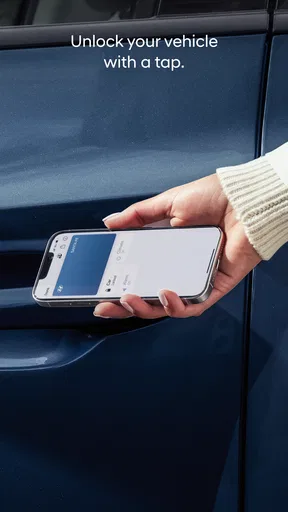
- Remote locking
- unlocking
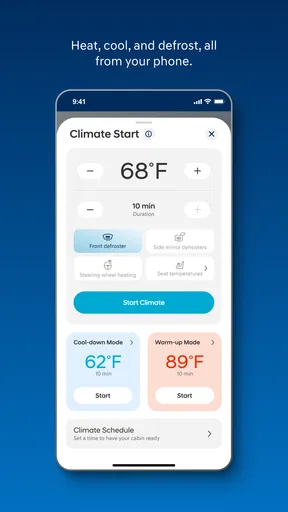
- and climate control add everyday convenience.
- Vehicle status checks help monitor doors
- windows
- fuel
- and battery remotely.
- Bluelink can assist with locating your parked Hyundai in unfamiliar areas.
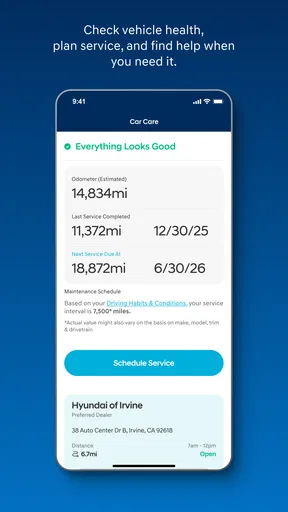
- Service scheduling and maintenance reminders simplify ownership tasks.
- Emergency assistance features can provide added reassurance on the road.
Cons
- Many features require a compatible Hyundai model and an active Bluelink subscription.
- Remote commands may fail when the car or phone has a weak network connection.
- Some functions can drain the vehicle battery if used repeatedly.
- The app may request extensive location and vehicle data permissions.
- Availability of features varies by country
- model year
- and Hyundai service plan.
FAQs for MyHyundai with Bluelink
What is MyHyundai with Bluelink, and what can I use it for?
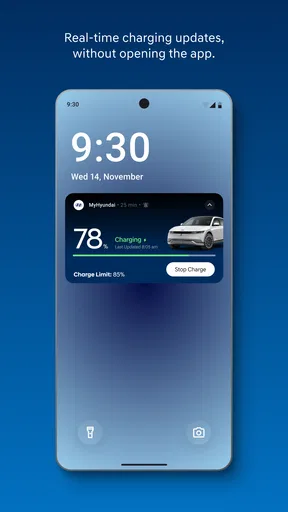
MyHyundai with Bluelink is Hyundai’s companion app for compatible vehicles and connected services. After signing in and pairing an eligible car, you can typically view vehicle information, check its location, lock or unlock the doors remotely, schedule charging on supported electric models, and request roadside or service assistance. Available features depend on your vehicle, country, model year, subscription, and mobile network coverage.
Does MyHyundai with Bluelink work with every Hyundai vehicle?
No. Bluelink functionality is limited to compatible Hyundai vehicles and may vary considerably by model, trim level, model year, and region. Some cars support remote commands and vehicle status, while others may offer additional services such as remote climate control, charging management, driving reports, or stolen-vehicle assistance. Check Hyundai’s official compatibility information or ask a local dealer before downloading or subscribing.
Is a subscription required to use MyHyundai with Bluelink?
Many Bluelink features require an active connected-services subscription, although Hyundai may include a complimentary trial with selected new vehicles. The length, pricing, renewal terms, and available functions differ between markets and vehicles. The app itself can usually be downloaded without charge, but downloading it does not guarantee access to every feature. Review the terms shown during registration before activating a plan.
Can I remotely start, lock, or locate my Hyundai using the app?
On supported vehicles and in eligible regions, MyHyundai with Bluelink can let you send commands such as remote locking, unlocking, or starting, and may display the vehicle’s last known location. Remote start and climate controls are not available on every model, particularly where local regulations or vehicle design restrict them. Commands also depend on cellular coverage, battery condition, and successful account verification.
Is MyHyundai with Bluelink safe and reliable for everyday use?
The app includes account authentication and connected-vehicle controls, so you should protect your login, use a strong unique password, and avoid sharing access casually. In testing, remote commands may take time or fail when the car is underground, has weak cellular reception, or has a low battery. Treat the app as a convenience rather than a replacement for checking that the vehicle is secure in person.


